Tip of the Month for: July 2017
Inventory Description Keyword Search now searches Auxiliary Descriptions
If you use Auxiliary Descriptions on inventory items for your customer and/or vendor forms such as Quotes, Pick Tickets, Invoices and Purchase Orders, you may be interested to know that starting in the last release of Answers that searching for inventory items using the Description Keyword Search can now also be asked to search thru Auxiliary Descriptions for the requested keyword(s).
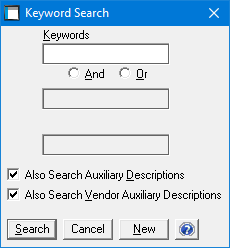
The Description Keyword Search is available in the inventory item search window by selecting it from the "Search Method pull-down menu bar option or by simply pressing <F6> once in the inventory search window.
The Description Keyword Search allows searching on up to three separate words along with using "and" or "or" criteria to combine the searching when more than one word is searched for.
New check boxes are now provided that also allow including or excluding searching for these keywords on both the Auxiliary Descriptions setup primarily for sales/customer forms and the Vendor Auxiliary Descriptions setup primarily for P/O related forms.
A "Keyword" is defined as any string of text that is surrounded by spaces within the Description field, and now with this new feature within any of the Auxiliary Description lines. The first six keywords on each line of the standard inventory description and each line of the Auxiliary Description can be searched upon efficiently using this search feature.