Revised, Voided, Canceled Customer Invoice Notifications
The most recent release of Answers released in September introduced a feature that notifies auto-send customers of voided or canceled invoices, as well as revisions to invoices that were re-instated and invoiced again.
If a customer is set up to automatically receive their invoice via fax or email, and you have invoiced a sales order, then the email has been sent, or the fax is sent/queued for sending. Re-instating cannot bring back the email, or delete the fax from the queue. So, we added an option that prompts the user to send a Voided or Canceled notice if they are re-instating an order to cancel it. This option will include the voided/canceled notice in the email and on the invoice form itself. If using the new forms, the wording is printed in a watermark style.
For invoices re-instated and then re-invoiced, the subsequent invoices show the wording "Revised"... thus notifying the customer that this is a new copy of an invoice they were previously sent. The idea is to head off any phone calls about multiple invoices received or the customer double-paying because they received multiple invoices.
Several users expressed dissatisfaction they could not control the Revised notification.
So, a subsequent update is in the works that will allow the user more control over how this feature works.
Under Order Processing Advanced Options, question #79 controls the customer notifications "Prompt to Send Customer Notifications when Re-instating an Invoice?"
When disabled, NO notifications are sent at all when invoices are re-instated and re-invoiced. This is how Answers worked in prior releases.
When enabled and after installing an update to be published on 11/01/17 or later, upon re-instating an invoice the user will be prevented with this prompt in the future:
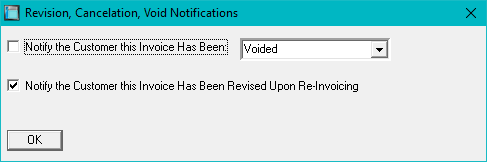
If you are voiding or canceling the order, the user will be able to check the first box, select either Voided or Canceled, or type something into the box, and an email/fax will be sent notifying the customer. The notification appears in the body of the email, the subject of the email, and on the form itself. And, if using the new forms, it will be in a watermark format.
If you wish to send a "Revised" notification when the sales order is invoiced again, then check the second box. The default is to send the revision notification. If you wish not to send a notification, then be sure to uncheck the box.
And, as stated earlier, if the configuration option is set to No, then this window is not presented and no notifications are sent.